

Irssi
An IRC client that combines minimalist design with powerful functionality.
Established in 1999, it became over the years one of the best, if not the best IRC client ever.
TODO: add more to this page, maybe copy from old wiki (not notepad wiki), this page is not complete compared to previously
My setup
If the terminal allows custom profiles with sounds, I usually use this beep.wav for irssi only.
SSH/AutoSSH config
On the client side, not on the irssi server. The rest on the page except this part, is on the irssi server.
With this setup you can simply type ssh irssi or autossh irssi.
For passwordless authentication, use
ssh-add ~/.ssh/your_keyafter each boot to cache your key passphrase.
~/.ssh/config:
Host irssi
    HostName irssi.vlan87.mths.io
    ProxyJump [email protected]
    User irssi
    ServerAliveInterval 1
    ServerAliveCountMax 4
    ConnectTimeout 10
    RequestTTY yes
    RemoteCommand screen -A -rx irssi
Screen config
tmux wasn't a thing back in the days yet, so screen it is.
Here's my ~/.screenrc:
defnonblock on
defutf8 on
vbell off
attrcolor b ".I"
termcapinfo xterm 'Co#256:AB=\E[48;5;%dm:AF=\E38;5;%dm'
defbce "on"
term screen-256color
startup_message off
#Only Shift+k to kill - prevent accidents
bind k
bind ^k
bind K kill
#F11/F12 resize window to fit terminal dimensions
bindkey -k F2 fit
bindkey -k F1 fit
Addons/scripts
Scripts are stored in ~/.irssi/scripts/ and can be automatically loaded on startup by placing them (or symlinking them) in ~/.irssi/scripts/autorun/
| Script | Description |
|---|---|
| active_notice Geert Hauwaerts |
This script shows incoming notices into the active channel |
| adv_windowlist Nei |
Adds a permanent advanced window list on the right or in a status bar[ 1|(status) 2|OPERINFO 4|#Mathias 7|#labspace 35|#ircsource 37|#bornhack 55|#sbfl ] |
| autochannel Peder Stray |
Auto add channels to channel list on join |
| autocycle Marcin Rozycki |
Auto regain ops in empty opless channels, when the last other user leave |
| autorejoin Timo 'cras' Sirainen, Leszek Matok |
Automatically rejoin to channel after being kicked, after a (short) user-defined delay |
| autoaway Larry "Vizzie" Daffner |
Automatically goes away after defined inactivity |
| autowrap Bitt Faulk |
Automatically wraps long sent messages into multiple shorter messages |
| caq Mathias - me, remind me to add link |
A quick command to close all those queries you have! |
| clones David Leadbeater |
/CLONES - Display clones in the active channel (with added options) |
| commonchannels Mathias - me, remind me to add link |
When a new query window opens, the script automatically lists the channels you have in commonIrssi: You and Nikolaj are both on these channels: #fgh, +#Denmark, +#Mathias (3)Irssi: Starting query in QuakeNet with Nikolaj |
| dns Timo 'cras' Sirainen |
/DNS <nick>|<host>|<ip> ... |
| epicrepeat Mathias - me, remind me to add link |
A quick command to repeat commands! Please only use for testing and random ascii arts/epicrepeat <number> <command> -> /epicrepeat 123 say Hello 123 times without delay. |
| go nohar |
Implements /go command that activates a window given a name/partial name. It features a nice completion/go lab<tab> -> /go #labspace, /go dark<tab> -> /go DarkDeviL |
| hack_whois_in_current_window Unknown |
Shows WHOIS in current window instead of status window |
| hilightwin Timo 'cras' Sirainen, Mark 'znx' Sangster, Kimberly 'rummik' Zick |
Print hilighted messages to window named "hilight" |
| ho_reformat Garion |
Hybrid Oper Script Collection - server notice reformatting |
| idletime Stefan 'tommie' Tomanek |
Retrieves the idletime of any nick |
| il Marcus Rueckert |
Adds a statusbar item which shows length of the inputline |
| irssinotifier Lauri 'murgo' Härsilä |
Send notifications about irssi highlights to server Note: May be defunct after 2023 Firebase updates, dev doesn't have enough time |
| keepnick Peder Stray |
Try to get your nick back when it becomes available, neat for unstable connections |
| killreconnect Garion |
Reconnects after a /KILL |
| lastfm Simon 'simmel' Lundström |
A now-playing-script which uses Last.fm/np -> * Mathias is listening to: Benjamin Hav - Husk At Vær' Happy |
| nickserv Geert Hauwaerts |
This script will authorize you into NickServ |
| oidenty darix |
oidentd support for irssi |
| opnotify Maciek 'fahren' Freudenheim |
Hilights window refnumber in statusbar if someone ops/deops you on channel |
| rainbow Jakub Jankowski |
Prints colored text. Rather simple than sophisticated |
| rotator BC-bd |
Displays a small, changing statusbar item to show irssi is still running Useful for checking if your SSH connection is alive and stable |
| scriptassist Stefan 'tommie' Tomanek |
Keeps your scripts on the cutting edge |
| timer Kimmo Lehto, Marcus Rueckert |
Provides /timer command for mIRC/BitchX type timer functionality |
| trackbar Peter 'kinlo' Leurs, Uwe Dudenhoeffer, Michiel Holtkamp, Nico R. Wohlgemuth, Geert Hauwaerts |
Shows a line bar where you have last read in a window, when coming back to it |
| usercount David Leadbeater, Timo Sirainen, Georg Lukas |
Adds a usercount for a channel as a statusbar item |
Config
Theme
I'm running the hv theme by cubik, it looks like this and can be downloaded here.
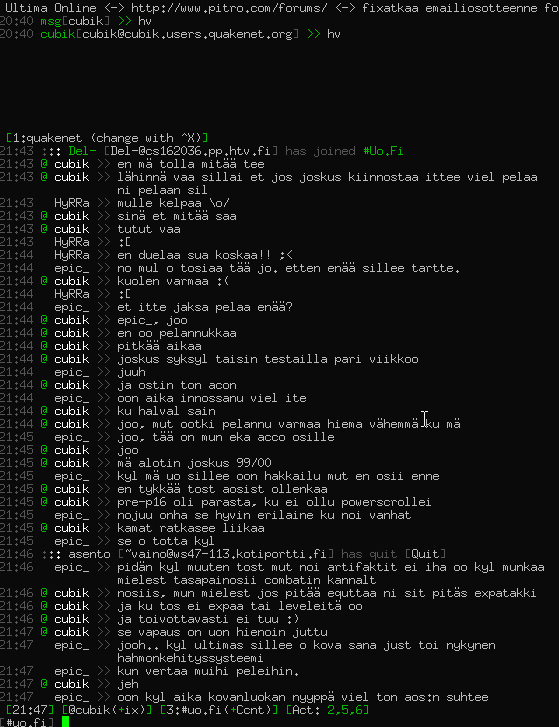
Mine is slightly altered on the colors (red instead of green).
Obviously everyone has their own theme preference, so remember to take a look at Irssi Themes
Settings
/set completion_char ,

/set dcc_autoget_max_size 1G
/set dcc_download_path ~/downloads/
/set dcc_own_ip ip:ip:ip::ip
/set dcc_timeout 600min

/set cmd_queue_speed 0
/set cmds_max_at_once 0
/set flood_max_msgs 0
/set flood_timecheck 0

/set activity_hide_level QUITS JOINS PARTS MODES TOPIC NICKS
/set activity_hide_targets #LED #TV
/set activity_msg_level PUBLIC
/set autoclose_query 172800
/set autocreate_query_level MSGS DCCMSGS
/set beep_msg_level MSGS NOTICES DCC DCCMSGS HILIGHT
/set hilight_nick_matches OFF
/set reuse_unused_windows ON
/set theme hv
/set timestamp_format  %d/%m/%Y %H:%M:%S

/set ban_type host
/set ctcp_userinfo_reply Enthusiastic Irssi user.
/set ctcp_version_reply Running Irssi with love!
/set part_message Leaving the channel. Have a great day!
/set quit_message Signing off!
/set usermode +iw

/set hostname ip:ip:ip::ip
/set nick mathias
/set real_name Mathias
/set user_name mathias

/set autolog ON
/set autolog_ignore_targets Q [email protected]
/set autolog_path ~/.irssi/logs/$tag/$0.log
/set log_timestamp %d/%m/%Y %H:%M:%S

# Addon/Script Settings

# [awl]
/set awl_block -15
/set awl_custom_key_re f\d+
/set awl_detach_data -3
/set awl_height_adjust 2
/set awl_hide_data 2
/set awl_maxcolumns 4
/set awl_maxlines 35
/set awl_mouse_offset 1
/set awl_path /home/mathias/.irssi/_windowlist
/set awl_placement bottom
/set awl_sort refnum
/set awl_viewer_tmux_position left
/set awl_viewer_xwin_command xterm +sb -e %A
/set fancy_abbrev fancy
/set mouse_escape 1
/set mouse_scroll 3

# [hilightwin]
/set hilightwin_show_network OFF

# [inputlength]
/set inputlength_width 0

# [irssinotifier]
/set irssinotifier_require_idle_seconds 10

# [keepnick]
/set keepnick_autosave ON

# [lastfm]
/set lastfm_output is listening to: %artist - %name
/set lastfm_user Mathias
Fast navigation
By default, you can only switch directly to windows 1-10 using meta + number keys (1-0).
With this setup, you can jump to any window 11-99 by typing two digits using the qwertyuiop keys while holding meta!
For example: meta + qq -> window 11, meta + rw -> window 42, etc.
/bind meta-q key win1
/bind meta-w key win2
/bind meta-e key win3
/bind meta-r key win4
/bind meta-t key win5
/bind meta-y key win6
/bind meta-u key win7
/bind meta-i key win8
/bind meta-o key win9
/bind meta-p key win0
/bind win0-win0 change_window 00
/bind win0-win1 change_window 01
/bind win0-win2 change_window 02
/bind win0-win3 change_window 03
/bind win0-win4 change_window 04
/bind win0-win5 change_window 05
/bind win0-win6 change_window 06
/bind win0-win7 change_window 07
/bind win0-win8 change_window 08
/bind win0-win9 change_window 09
/bind win1-win0 change_window 10
/bind win1-win1 change_window 11
/bind win1-win2 change_window 12
/bind win1-win3 change_window 13
/bind win1-win4 change_window 14
/bind win1-win5 change_window 15
/bind win1-win6 change_window 16
/bind win1-win7 change_window 17
/bind win1-win8 change_window 18
/bind win1-win9 change_window 19
/bind win2-win0 change_window 20
/bind win2-win1 change_window 21
/bind win2-win2 change_window 22
/bind win2-win3 change_window 23
/bind win2-win4 change_window 24
/bind win2-win5 change_window 25
/bind win2-win6 change_window 26
/bind win2-win7 change_window 27
/bind win2-win8 change_window 28
/bind win2-win9 change_window 29
/bind win3-win0 change_window 30
/bind win3-win1 change_window 31
/bind win3-win2 change_window 32
/bind win3-win3 change_window 33
/bind win3-win4 change_window 34
/bind win3-win5 change_window 35
/bind win3-win6 change_window 36
/bind win3-win7 change_window 37
/bind win3-win8 change_window 38
/bind win3-win9 change_window 39
/bind win4-win0 change_window 40
/bind win4-win1 change_window 41
/bind win4-win2 change_window 42
/bind win4-win3 change_window 43
/bind win4-win4 change_window 44
/bind win4-win5 change_window 45
/bind win4-win6 change_window 46
/bind win4-win7 change_window 47
/bind win4-win8 change_window 48
/bind win4-win9 change_window 49
/bind win5-win0 change_window 50
/bind win5-win1 change_window 51
/bind win5-win2 change_window 52
/bind win5-win3 change_window 53
/bind win5-win4 change_window 54
/bind win5-win5 change_window 55
/bind win5-win6 change_window 56
/bind win5-win7 change_window 57
/bind win5-win8 change_window 58
/bind win5-win9 change_window 59
/bind win6-win0 change_window 60
/bind win6-win1 change_window 61
/bind win6-win2 change_window 62
/bind win6-win3 change_window 63
/bind win6-win4 change_window 64
/bind win6-win5 change_window 65
/bind win6-win6 change_window 66
/bind win6-win7 change_window 67
/bind win6-win8 change_window 68
/bind win6-win9 change_window 69
/bind win7-win0 change_window 70
/bind win7-win1 change_window 71
/bind win7-win2 change_window 72
/bind win7-win3 change_window 73
/bind win7-win4 change_window 74
/bind win7-win5 change_window 75
/bind win7-win6 change_window 76
/bind win7-win7 change_window 77
/bind win7-win8 change_window 78
/bind win7-win9 change_window 79
/bind win8-win0 change_window 80
/bind win8-win1 change_window 81
/bind win8-win2 change_window 82
/bind win8-win3 change_window 83
/bind win8-win4 change_window 84
/bind win8-win5 change_window 85
/bind win8-win6 change_window 86
/bind win8-win7 change_window 87
/bind win8-win8 change_window 88
/bind win8-win9 change_window 89
/bind win9-win0 change_window 90
/bind win9-win1 change_window 91
/bind win9-win2 change_window 92
/bind win9-win3 change_window 93
/bind win9-win4 change_window 94
/bind win9-win5 change_window 95
/bind win9-win6 change_window 96
/bind win9-win7 change_window 97
/bind win9-win8 change_window 98
/bind win9-win9 change_window 99
Credit: These keybinds likely originated from Niklas Laxström's site, though they were recommended to me by a friend with link to another site, many many years back.
LLM were used for grammar and spellchecking on this page