IPv6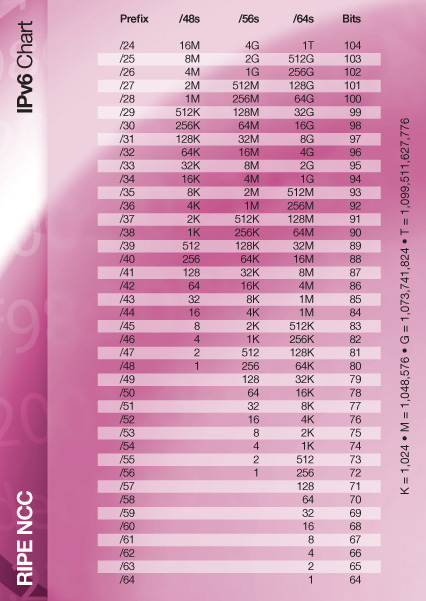 

"We have enough IPv4 addresses."
"We wont do IPv6, we will use the next IP version after that."
"What's IPv6?"
"We do not care about other EU countries already having NAT64 or DS-lite networks. And their customers therefor rent IPv6 only servers that you cannot access."
"IPv6 is garbage and nobody wants to use it"
"No one on the internet uses IPv6 yet, it's pointless"
"IPv4 NAT was fixed 10 years ago, we don't need IPv6"
"We use IPv4 CGN so it's all fine, there's no need for IPv6"
"IPv6 just isn't a priority"
"IPv6 is just a marketing gimmick, is slower and requires more processing"
"IPv6 is insecure, NAT is a firewall, there's no privacy"
"We have IPv6, but we just want to keep things simple"
"None of our customers want it"
"It's too complicated"
"The IPv6 will soon be outdated again"
"No one else has deployed it"
"We'll deploy IPv6 next year"
"End users don't care about IPv6"
"We don't need that many addresses"
"You already have IPv6, your IP is x.x.x.x"
"Can't we just buy more IPv4 addresses?"
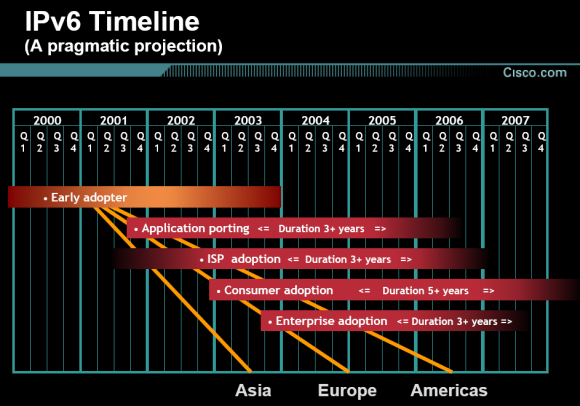
Internet Protocol, Version 6 (IPv6) Specification:
RFC1883 December 1995 - Initial IPv6 spec, 14 years after IPv4
RFC2460 December 1998 - Header format revisions and addressing architecture refinements
RFC8200 July 2017 - Security hardening, clarifications, and formal standardization
1996 IPv6 support in the Linux kernel
1998 Microsoft Research releases its first experimental IPv6 stack
1999 First IPv6 tunnel broker, by Ivano Guardini
2000 FreeBSD shipped IPv6 support as part of the FreeBSD 4.0 release
2001 Cisco Systems introduces IPv6 support on Cisco IOS routers and L3 switches.
2002 Windows XP SP1 and Windows Server 2003, IPv6 is included as a core networking technology
2003 Apple Mac OS X v10.3 "Panther" supports IPv6 which is enabled by default.
2008 the European Commission publish their Action Plan for the deployment of Internet Protocol version 6 (IPv6) in Europe, with the aim of making IPv6 available to 25% of European users by 2010
Some highlights from Wikipedia – go to Major milestones to see more:
World IPv6 Test Day June 8, 2011 – "major web companies and other industry players enabled IPv6 on their main websites for 24 hours."
World IPv6 Launch Day June 6, 2012 – "this time, it's for real" – "leaving IPv6 permanently enabled on all participating sites"
IPv6 was invented years ago, all major operating systems have had IPv6 support for years, and major websites have had IPv6 permanently enabled for over years.
And yet, we're still stuck with most ISPs clinging to IPv4 that's years old, because their seniors claims that IPv6 are "too modern" for unknown reasons.
General
The IPv6 address
An IPv6 address consists of 128 bits, represented in 8 groups, and is written in hexadecimal.
Example:
2001:0db8:03e4:7891:2f3a:9a16:dd8e:3a3dCompacting
You can remove all leading zeros in each group. When there are multiple groups containing only zeros, you can use the shorthand notation (::).
Example:
2001:0db8:0000:0000:0000:beef:0042:1337
2001: db8:0000:0000:0000:beef:  42:1337
2001: db8:    :          beef:  42:1337 (2001:db8::beef:42:1337)


2001:0db8:0000:0000:0000:0000:0042:1337
2001: db8:0000:0000:0000:0000:  42:1337
2001: db8:    :                 42:1337 (2001:db8::42:1337)

2001:0db8:0000:0000:0000:0000:0000:0007
2001: db8:0000:0000:0000:0000:0000:   7
2001: db8:    :                       7 (2001:db8::7)
Prefixes
IPv6 uses CIDR notation just like IPv4, but with different standard allocations.
| Prefix Size | Typical Use | Number of Addresses | Description |
|---|---|---|---|
| /128 | Single host | 1 | A single IPv6 address, similar to /32 in IPv4 |
| /127 | Point-to-Point | 2 | PtP between routers, used to route larger prefixes over. See RFC6164 |
| /64 | Standard subnet | 2⁶⁴ (18.4 quintillion) | Standard allocation for local networks - required size for SLAAC |
| /56 | Home/SMB | 2⁷² (256 /64 networks) | Annoying ISP allocation for home/small business users |
| /48 | Home/Organization | 2⁸⁰ (65,536 /64 networks) | Standard allocation for homes, businesses and organizations |
| /32 | ISP/Large Org | 2⁹⁶ | Typical allocation to an ISP from a Regional Internet Registry |
A /64 is the minimum recommended subnet size as many IPv6 features like SLAAC require it. Unlike IPv4, IPv6 has plenty of addresses, so there's no reason to use smaller subnets like /96 or /112 – these can actually break functionality. Home users should request at least a /56 from their ISP to allow for multiple network segments.
Unlike IPv4, IPv6 does not use broadcast addresses. However, you should still avoid assigning the very first and the very last addresses in a standard subnet. The first address (::0) is reserved as the Subnet-Router anycast address. The absolute last address (along with a small block at the very end of the subnet) is also reserved for advanced routing features like Mobile IPv6 (RFC 2526).
Exception: On /127 Point-to-Point links (RFC 6164) and /128, the subnet is so small that these rules are disabled, and every address is fully usable.
Broadcast
No, not possible, it doesn't exists – use multicast instead.
It's a good way to test those "IPv6 experts" that claims it's bad. Most of them seems to think broadcast exists and will cause a mess with these large subnets..
The closest alternative to an IPv4 broadcast, are IPv6 ff02::1 multicast (all nodes in link local)
Header Structure
IPv6 significantly simplifies the header structure compared to IPv4, making packet processing more efficient.
IPv6 brings several important improvements over IPv4 header design. It implements a fixed header size of 40 bytes that simplifies and speeds up router processing. Fragmentation fields have been removed and are now handled by sending hosts rather than routers. The header checksum has been eliminated, reducing processing overhead on every hop. Options have been moved outside the main header as extension headers for better efficiency. IPv6 also introduces flow labeling for better traffic management of real-time applications. Overall, the simplified structure with fewer fields to process means better performance in routing operations.
These changes make IPv6 more efficient for routing despite the larger addresses.
Security
Privacy
IPv6 has the IPv6 Privacy Extension (RFC8981), which 99% of devices configured using a stateless method use. In Windows, it's called "Temporary Addresses" and usually lasts around 4 hours before being replaced with a new address.
I personally haven't seen a device yet that doesn't make use of the privacy extensions when using SLAAC.
Said in a simplified way, people tracking your visits will only see traffic coming from your network/prefix (similar to how IPv4 works with NAT), not from a specific device within your network. Your entire network appears as one entity to outside observers.
DAD (Duplicate Address Detection, RFC4429) prevents two devices from using the same IP address. This helps your devices, when selecting a new temporary/privacy address.
Please don't fall for the myths about IPv6. And good luck to those who try to scan 18446744073709551616 (/64) firewalled IP addresses every few hours on all ports.
Firewall
One common misconception is that NAT provides security in IPv4. NAT was never designed as a security feature - it was created to temporarily solve address scarcity.
With IPv6, you still need a proper firewall, just as you do with IPv4.
The approach is simpler: Allow Established/Related connections, allow ICMPv6, and have the default action drop everything else.
This will cover all your devices if you set it on your wan in, on your router, and if you need to open a port, simply just make an accept rule on with the dst ip and dst port.
This straightforward approach provides better security than relying on NAT's side effects and lets you control exactly what traffic reaches your network.
Your ISP could (if they wanted to) also offer a default firewall as a service, but I doubt and hope that this will never happen.
Note if you use VLANs or similar in your network, and have those routed, there needs to be additional rules obviously. But you would also need this if it were IPv4.
And just like in the IPv4, having a firewall on your device, are a must have thing to have. Even having your router protecting you from attacks from the internet, you still need to remember we have a lot of IoT in our home. And sometimes we let guests use our network, or we use theirs, or a public hotspot.
Ranges
Address space
Official IANA space allocations.
| Range | Allocation | Use case |
|---|---|---|
| 2000::/3 | Global Unicast | The public internet 😎 |
| fc00::/7 | Unique Local Unicast | Private ranges; you can use these for VPNs and such. Note: You may only use fd00::/8 without registration. |
| fe80::/10 | Link-Scoped Unicast | Auto generated for your NIC. In the IPv4 world (169.254.0.0/16) this gets removed when an IP is set, but on IPv6 we keep it! 🏠 |
| ff00::/8 | Multicast | IPv6 doesn't have broadcast, so we use multicast for spamming instead. |
For assignments, see the IANA IPv6 Unicast Address Assignments.
Other ranges
| Range | Description |
|---|---|
| ::/0 | The entire internet's default route – I know, it's so hard to guess. |
| ::/128 | "Unspecified Address" – When you don't have an address yet, and you're asking ff02::2 over ICMPv6 for network details. |
| ::1/128 | Loopback – sometimes talking to yourself is better than no IPv6 at all. |
| 100::/64 | Discard-Only – basically a black hole, used for mitigating DDoS and more. |
| 64:ff9b::/96 | For networks with NAT64, where your own network is IPv6 only. This (or DS-lite) will be used when we're finally done with WAN IPv4. |
| 64:ff9b:1::/48 | Same as above, just not globally reachable. |
| 2001::/32 | Teredo tunnels – for those behind ISPs with no IPv6 at all and for end users without IPv6 tunnel brokers. |
| 2001:db8::/32 | Reserved for use in documentation and more. |
Multicast
| Address | Description |
|---|---|
| ff01::1 | Multicast to all nodes in the interface-local scope |
| ff02::1 | Multicast to all nodes in the link-local scope |
| ff01::2 | Multicast to all routers in the interface-local scope |
| ff02::2 | Multicast to all routers in the link-local scope |
| ff05::2 | Multicast to all routers in the site-local scope |
| ff02::1:2 | Multicast to all the DHCPv6 servers and relay agents in the link-local scope |
| ff01::101 | Multicast to all NTP servers in the interface-local scope |
| ff02::101 | Multicast to all NTP servers in the link-local scope |
| ff03::101 | Multicast to all NTP servers in the realm-local scope |
| ff04::101 | Multicast to all NTP servers in the admin-local scope |
| ff05::101 | Multicast to all NTP servers in the site-local scope |
| ff08::101 | Multicast to all NTP servers in the organization-local scope |
| ff0e::101 | Multicast to all NTP servers in the global scope |
| ff02::1:ff00:0/104 | Solicited-node multicast address |
Pro tip: ping the multicast then check your neighborhood with ip -6 neigh. You can now find your stateless devices 😉
Public Services
DNS Servers
| Address | Provider | Type |
|---|---|---|
| 2620:fe::fe | Quad9 | Malware blocking, DNSSEC validation |
| 2620:fe::9 | Quad9 | Malware blocking, DNSSEC validation |
| 2620:fe::11 | Quad9 | Secured w/ECS: Malware blocking, DNSSEC validation, ECS enabled |
| 2620:fe::fe:11 | Quad9 | Secured w/ECS: Malware blocking, DNSSEC validation, ECS enabled |
| 2620:fe::10 | Quad9 | Unsecured: No malware blocking, no DNSSEC validation |
| 2620:fe::fe:10 | Quad9 | Unsecured: No malware blocking, no DNSSEC validation |
| 2001:4860:4860::8888 | Normal | |
| 2001:4860:4860::8844 | Normal | |
| 2001:4860:4860::6464 | DNS64 for use with NAT64 (64:ff9b::/96) | |
| 2001:4860:4860::64 | DNS64 for use with NAT64 (64:ff9b::/96) | |
| 2606:4700:4700::1111 | Cloudflare | Normal |
| 2606:4700:4700::1001 | Cloudflare | Normal |
| 2606:4700:4700::64 | Cloudflare | DNS64 for use with NAT64 (64:ff9b::/96) |
| 2606:4700:4700::6400 | Cloudflare | DNS64 for use with NAT64 (64:ff9b::/96) |
| 2620:119:35::35 | OpenDNS | Normal |
| 2620:119:53::53 | OpenDNS | Normal |
Test websites
| Website | Description |
|---|---|
| https://z7.dk | Shows your IPv4 & IPv6, with location from free GeoIP databases |
| https://internet.nl | Checks if a website, email or your connection has IPv6 |
| https://test-ipv6.com | Runs multiple IPv6 connectivity tests |
| https://ipv6-test.com | Runs multiple IPv6 connectivity tests. But they are usually broken in some tests |
| https://ipv6test.google.com | Simple confirmation if you have IPv6 or not |
NAT64
NAT64 is a stateful translator that lets IPv6 only clients reach IPv4 only servers by translating packets at the network edge. It's usually paired with DNS64, which synthesizes AAAA records by embedding IPv4 addresses into a configured IPv6 prefix (usually 64:ff9b::/96 per RFC6052).
When your IPv6 only device queries for an IPv4 only website, DNS64 creates a synthetic IPv6 address:
IPv4 address:    A    140.82.112.4 (github.com)
Dec into hex:         8c  52 70  04
DNS64 result:    AAAA 64:ff9b::8c52:7004
This allows IPv6 only networks to access legacy IPv4 services seamlessly. While ISPs typically provide NAT64, public providers have become available for the IPv6 community.
For an updated table of public NAT64 providers, visit nat64.net/public-providers by Kasper Dupont. There's also someone who has setup a status page monitoring public NAT64 availability and response times.
Tunnel Brokers
Note: As of today, many previously available tunnel broker services are no longer active. Since half of the world now has IPv6 at home, there's no need for these anymore
| Provider | Website | Coverage | Features/Notes |
|---|---|---|---|
| Hurricane Electric | tunnelbroker.net | Global | Free, multiple endpoints worldwide, /48 delegations, DNS services |
| 6project | 6project.org | Global | Small one-time setup fee, stable service, /64, /80. Has OpenVPN option, for those on the go |
| TunnelBroker.se | tunnelbroker.se | Sweden/Europe | Free for /60 10Mbps, more starts at 60SEK/month |
| NetAssist | tb.netassist.ua | Europe | Free /48 service with endpoints in Ukraine and other European locations |
For a longer list of tunnel brokers see the list of IPv6 tunnel brokers on Wikipedia and tunnelbroker.services.
Tools
NAT64 IP conversion tool
Convert between IPv4 and IPv6 addresses using NAT64 mapping.
IPv6 Link-Local ↔ MAC IEEE EUI-64 converter
Trouble finding an IoT device's IP? Try this tool!
Just be aware that Link-Local addresses are not always based on the MAC address. This usually happens when VLANs and/or other things are used, or simply when the device/system does not follow EUI-64.
Less than 5% of this page was written by LLM (spell/grammar check)