Huawei E8372 Wingle
This was imported from my old wiki, there might be better replacements for this today, but I still use it sometimes.
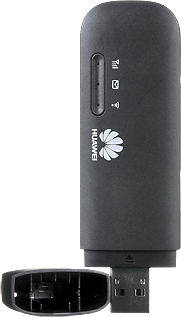
This is just a short collection of probably common questions about the E8372.
I made this page just to help you with your research.
My model is Huawei E8372h-153.
But I also have Huawei E3372h-153.
The ONLY difference is that E3372 is slightly smaller and does not have WiFi (but still does CDC Ethernet aka. "driverless").
I can recommend the E3372 instead of E8372 if you don't need the WiFi feature.
Please be aware that this wingle is only Cat4. See speeds below to determine if it's fast enough for your needs.
I would recommend checking if a newer wingle has been released before ordering.
Power usage?
Official specs say 0.75A. But I've measured 0.5-1.1A @ 5V.
But it seems to be working fine with less when connected to a PC. So I'm not sure?
You'll save 0.09-0.15A by disabling the WiFi if you don't need it :)
Be careful when using it on powerbanks!
When maxing out the internet speed, it for some odd reason resets some of my power banks.
I'm guessing it's the small peaks that trigger the short circuit protection some power banks have.
SMS?
I haven't tried it. But messages can be sent and received using the web dashboard.
Seems like SMS Delivery Reports are also available :)
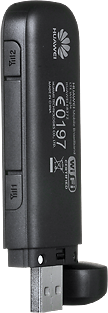
WiFi Repeater???
I haven't tried it. But the web interface claims to have this feature.
It's supposed to be for like a failover.
If your WiFi goes down, it will use the mobile data connection instead.
The idea is great, but just remember max 10 WiFi clients, and that the WiFi is already "slow" :)
Driverless?
Depends on how you look at it, but the short answer is YES.
The wingle provides both WiFi and CDC Ethernet.
Which means, if the device is plugged into your computer, it will see an ethernet (over USB) connection.
On Linux, it seems to be plug-and-play on most distros (all of the ones I have tried it on).
It shows up as: ID 12d1:14db Huawei Technologies Co., Ltd. E353/E3131
And network managers pick up the CDC Ethernet with no problem.
On Windows, it is "driverless" if Windows has the driver (doh?).
If no driver has made contact with the CDC Ethernet, it seems to launch the virtual CD-ROM drive.
On that drive, you have a few files. Autorun.exe runs without any prompts; after installing the CDC Ethernet driver it closes and ejects the virtual CD-ROM.
On Mac, I have no idea. And no plans of trying. But you can always just connect to the Wi-Fi I guess?
External Antenna socket?
Huawei says: TS5
Internet says: TS9
Resellers say: CRC9
And I have no idea, as they look the same.
Also remember to select an antenna that covers your frequencies.
Speed
FDD LTE Cat4: 150/50Mbps @20M BW
HSPA+: 42/5.76, 21/5.76 Mbps
HSPA: 14/5.76, 7.⅖.76 Mbps
But just remember, the WiFi speeds won't be fast enough. (Tested using Intel AC 7265)
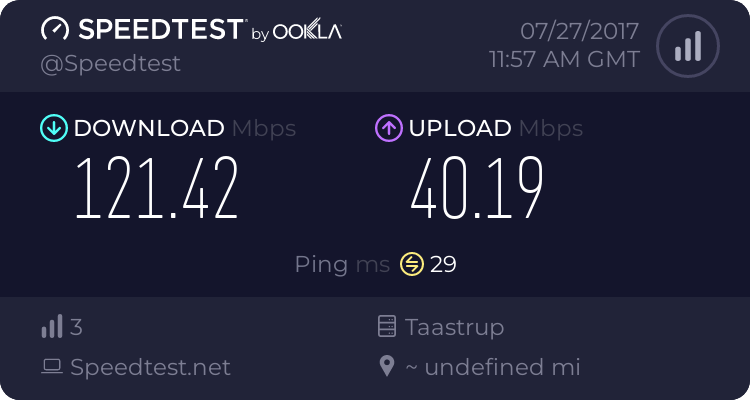
I haven't been able to get above 70/30 Mbit using WiFi. And therefore recommend using it over USB.
Here's my provider with "3" in Denmark, about 1-2km from the provider's antenna:
Frequencies
WiFi: 2.4 GHz 802.11 b/g/n
E8372h-153 support:
- LTE FDD: Band1(2100 MHz)/Band3(1800 MHz)/Band7(2600 MHz)/Band8(900 MHz)/Band20(800 MHz)
- DC-HSPA+/HSPA+/HSPA/UMTS: Band1(2100 MHz)/Band8(900 MHz)
- EDGE/GPRS/GSM: 850 MHz/900 MHz/1800 MHz/1900 MHz
E8372h-510 support:
- LTE FDD: Band 1(2100 MHz)/Band 2(1900 MHz)/Band 4(AWS)/Band 5(850MHz)/Band 7(2600 MHz)/Band 28(700 MHz)
- DC-HSPA+/HSPA+/HSPA/UMTS: Band 1(2100 MHz)/Band 2(1900 MHz)/Band 4(AWS)/Band 5(850 MHz)
- EDGE/GPRS/GSM: Band 2(1900 MHz)/Band 3(1800 MHz)/Band 5(850 MHz)/Band 8(900 MHz)
E8372h-511 support:
- LTE FDD: Band 1(2100 MHz)/Band 2(1900 MHz)/Band 4(AWS)/Band 5(850MHz)/Band 17(700 MHz)
- DC-HSPA+/HSPA+/HSPA/UMTS: Band 1(2100 MHz)/Band 2(1900 MHz)/Band 4(AWS)/Band 5(850 MHz)
- EDGE/GPRS/GSM: Band 2(1900 MHz)/Band 3(1800 MHz)/Band 5(850 MHz)/Band 8(900 MHz)
E8372h-517 support:
- LTE FDD: Band 1(2100 MHz)/Band 2(1900 MHz)/Band 4(AWS)/Band 5(850MHz)/Band12 (700Mhz)/Band 17(700 MHz)
- DC-HSPA+/HSPA+/HSPA/UMTS: Band 1(2100 MHz)/Band 5(850 MHz)
- EDGE/GPRS/GSM: Band 3(1800 MHz)/Band 5(850 MHz)/Band 8(900 MHz)
E8372h-607 support:
- LTE FDD: Band 3(1800 MHz)/Band 7(2600 MHz)/Band 28(700MHz)/TD-FDD Band 40(2300MHz)
- DC-HSPA+/HSPA+/HSPA/UMTS: Band 1(2100 MHz)/Band 8(900 MHz)
- EDGE/GPRS/GSM: Band2(1900 MHz)/Band3(1800 MHz)/Band 5(850 MHz)/Band 8(900 MHz)
E8372h-608 support:
- LTE FDD: Band1(2100 MHz)/Band3(1800 MHz)/Band5(850 MHz)/Band7(2600 MHz)/Band28(700 MHz)
- DC-HSPA+/HSPA+/UMTS: Band1(2100 MHz)/Band5(850 MHz)
- EDGE/GPRS/GSM: 850 MHz/900 MHz/1800 MHz/1900 MHz
E8372h-927 support:
- LTE FDD: Band 1(2100 MHz)/Band 3(1800 MHz)/Band 8(900 MHz)
- LTE TDD Band 40(2300 MHz)
- DC-HSPA+/HSPA+/UMTS: Band 1(2100 MHz)/Band 8(900 MHz)
- EDGE/GPRS/GSM: Band 2(1900 MHz)/Band 3(1800 MHz)/Band 5(850 MHz)/Band 8(900 MHz)
Where to buy?
Find the model with the frequencies for your country, for example E8372h-153, and put it into the search fields on eBay and AliExpress.
Remember to buy the unlocked ones. Unless you're up for the challenge.
I recommend flashing the firmware when received, which doesn't seem to be available officially from Huawei anymore.